
Post Production Video Editing: Complete Guide for 2026
Discover how post production video editing transforms raw footage into professional content. Learn workflows, tools, and outsourcing tips.
10 Min. ReadRead More
5 dedicated editor spots open this week. Book a call to reserve →

 Kiara WalkerCocktales Podcast
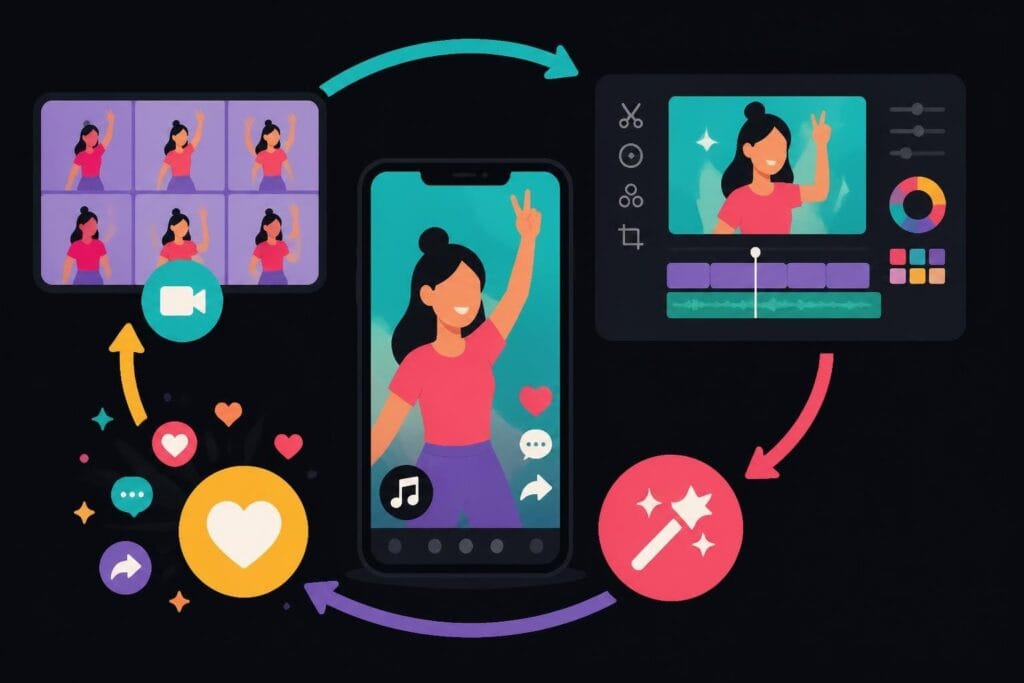
Master TikTok video editing in 2026 with expert tips on hooks, transitions, effects, and outsourcing. Save time while creating scroll-stopping content.
 Knowledge Base
July 27, 2026
Creating TikTok content that stops the scroll isn't just about having a great idea anymore. The difference between a video that tanks and one that goes viral often comes down to editing. But here's the thing: tiktok video editing has evolved way beyond simple cuts and transitions. In 2026, creators are dealing with AI-powered effects, algorithm preferences that change monthly, and an audience with an attention span shorter than a goldfish's. Whether you're a business owner trying to build brand awareness, a marketer managing multiple clients, or a content creator racing against deadlines, understanding the editing landscape is crucial. The good news? You don't have to become a video editing wizard overnight. You just need to know what works and how to get it done efficiently.
Let's cut through the noise. Every day, millions of videos flood TikTok, and only a fraction break through to the For You Page. What separates winning content from forgotten uploads? Strategic editing choices.
Your editing decisions directly impact three critical metrics:
Research on TikTok’s recommendation system shows that even slight improvements in these metrics dramatically increase your content's reach. The algorithm doesn't care about your production budget or fancy camera. It cares about whether people watch, react, and come back for more.

Here's where most businesses mess up: they treat TikTok like YouTube. Big mistake.
On TikTok, you have roughly 1.7 seconds before someone scrolls past your video. That's not even enough time to say your brand name. Your hook needs to be visual, immediate, and irresistible. This is where understanding TikTok editing fundamentals becomes non-negotiable.
Smart tiktok video editing starts before you ever upload. It begins with understanding how to structure your content for maximum retention. Jump cuts, text overlays that appear instantly, and movement in the opening frame all play crucial roles.
Nobody has time to learn complicated software when you're juggling client calls, strategy sessions, and actually running a business. That's reality. So let's focus on what actually moves the needle.
The data-backed editing strategies from OpusClip reveal consistent patterns in high-performing content:
| Hook Type | Use Case | Average Retention |
|---|---|---|
| Question Opening | Educational content | 67% |
| Bold Statement | Controversial/hot takes | 72% |
| Pattern Interrupt | Entertainment | 78% |
| Text Reveal | Tips and tutorials | 64% |
Notice how entertainment-style pattern interrupts win? That's because they create immediate curiosity. A record scratch, a sudden zoom, an unexpected cut – these techniques hijack attention before the brain processes what's happening.
Here's something most people don't talk about: cut frequency matters more than production quality. Amateur tiktok video editing often features long, static shots. Professional content? It's almost frenetic.
Analyze top-performing TikToks in any niche and you'll find:
This doesn't mean chaotic editing. It means purposeful pacing that respects your viewer's time and attention.
Adding text isn't just about accessibility (though that matters). Strategic text placement guides viewer attention and reinforces your message when audio isn't an option.
Best practices for text in TikTok videos:
The creators winning on specialized TikTok editing services understand that every element needs to work together seamlessly.
Remember when every TikTok had that glitchy transition? Then it was finger snaps. Then hand swipes. Trends change fast, but the principles don't.
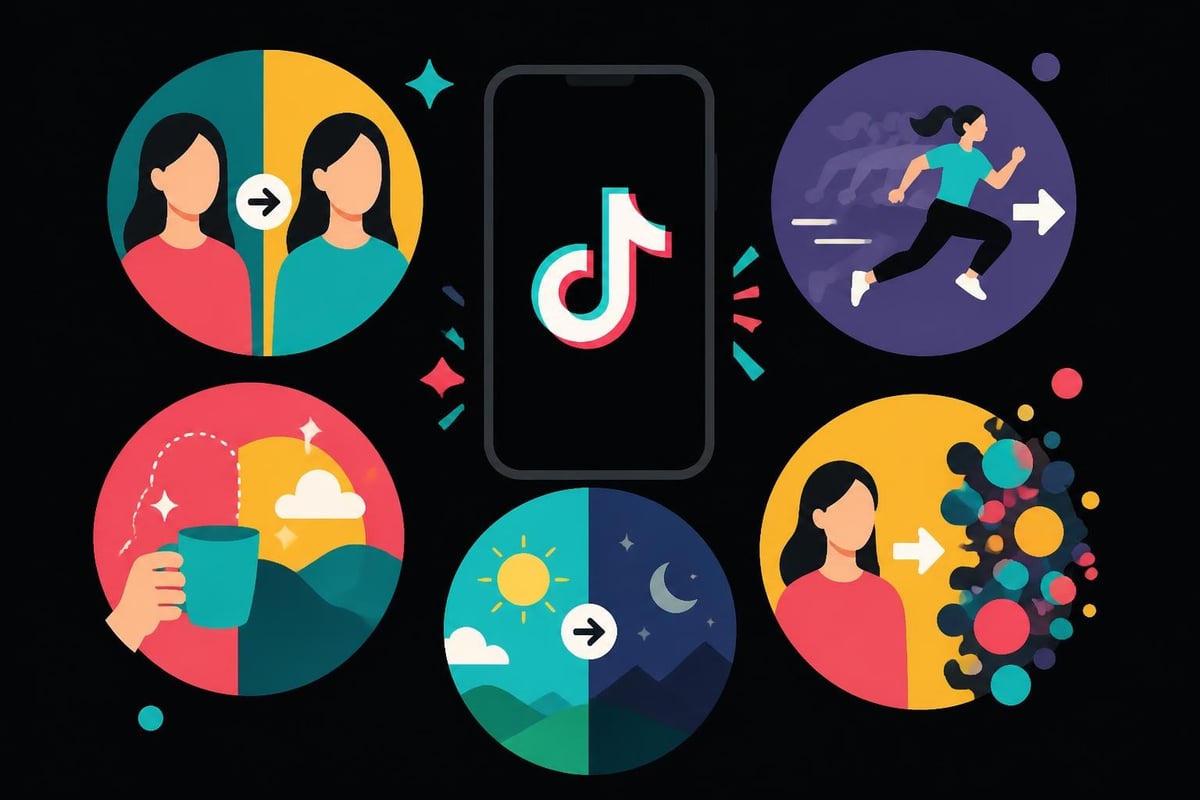
Different transitions serve different purposes. Using them randomly makes your content feel amateur. Using them strategically? That's what separates professional tiktok video editing from the rest.
The key? Subtlety beats spectacle. A smooth, barely-noticeable transition often performs better than flashy effects that scream "look at me!"
Your audience is smart. They've seen every trick in the book. Overusing trendy transitions makes your content feel like a TikTok tutorial instead of authentic communication.
Mix it up. Sometimes a simple cut is the most powerful choice. Other times, a creative transition elevates the story. Context determines the technique.
Here's what nobody tells you about tiktok video editing: audio accounts for 60% of the engagement decision. Not visuals. Audio.
This debate rages in every marketing team. Should you jump on trending sounds or create original audio? The answer in 2026: both, strategically.
Trending audio advantages:
Original audio advantages:
Business owners and agencies often find success by creating original audio that sounds like trending formats. It's the best of both worlds.
Volume leveling might sound technical, but it's crucial. Your voiceover shouldn't fight with background music. Sound effects should enhance, not overwhelm. Silence can be powerful when used intentionally.
Professional editors know to:
Modern AI editing tools can handle much of this automatically, but understanding the principles matters.
TikTok's built-in effects library is massive. And mostly useless for business content.
Not because effects don't work – they do. But because 90% of creators use them as decoration instead of communication tools. That's the difference.
| Effect Category | Business Use Case | Effectiveness Rating |
|---|---|---|
| Green Screen | Product showcases, testimonials | High |
| Time Effects | Process demonstrations | Medium-High |
| AR Filters | Brand engagement, entertainment | Medium |
| Color Grading | Aesthetic consistency | High |
| Text Effects | Educational content | Medium-High |
Notice how the most effective options serve functional purposes? They help tell your story, not distract from it.
Some of the highest-performing business content on TikTok uses zero effects. Just solid editing fundamentals: good pacing, clear audio, strategic text placement, and authentic delivery.
This is particularly relevant for service-based businesses. Your audience wants to connect with you, not your ability to add sparkles and rainbows. Save the heavy effects for entertainment content where they fit naturally.
Every single person watching your TikToks is on mobile. Yet creators constantly make desktop-first editing decisions. That ends now.
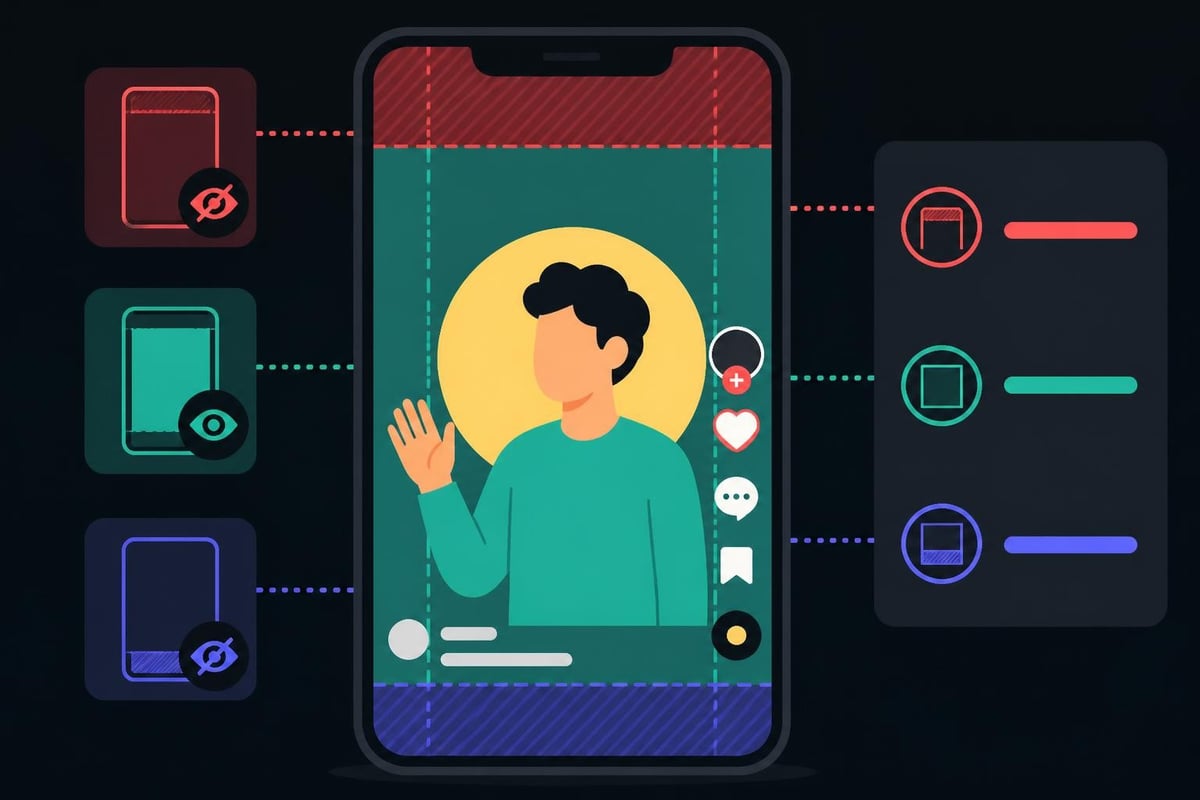
Forget everything you learned about traditional video composition. The rule of thirds still applies, but now it's vertical. Your subject should occupy the middle two-thirds of the frame, avoiding TikTok's interface elements.
Critical mobile considerations:
Testing your videos on an actual phone before publishing isn't optional. What looks perfect on your laptop screen might be unwatchable on mobile.
TikTok compresses everything, but starting with high-quality exports matters. The platform's compression algorithms work better with clean source files.
Export settings that work in 2026:
These specs ensure your carefully edited content doesn't turn into a pixelated mess after upload.
Let's talk honestly. You started your business to serve clients, build a brand, or create something meaningful. Not to spend hours learning jump cuts and color grading.
Creating quality TikTok content following all these best practices takes serious time:
That's 3-5 hours per video. Post daily? That's your entire work week.
The comprehensive TikTok editing approaches covered by CreatorSpaceHQ show exactly why professionals choose to delegate this work.
Beyond time savings, dedicated editors offer:
Business owners who've made the switch to professional editing services often say the same thing: "I wish I'd done this sooner."
The tiktok video editing landscape keeps evolving. What worked last year feels outdated now. Here's what's gaining traction.
AI-powered video editing tools have matured significantly. They're no longer just novelties – they're legitimate workflow enhancers.
Current AI capabilities worth exploring:
The key is using AI as a starting point, not the final product. Human creativity still wins.
Single-take TikToks are fading. The winning format in 2026 involves multiple scenes woven together into cohesive narratives.
This requires more sophisticated tiktok video editing:
Think of each TikTok as a micro-movie with setup, development, and payoff.
TikTok's interactive features keep expanding. Smart creators integrate these directly into their editing workflow:
These aren't afterthoughts. They're editing decisions made during the planning phase.
TikTok isn't just another social platform. It has unique technical requirements and algorithmic preferences that impact editing choices.
The algorithm in 2026 heavily favors certain editing patterns, according to research on multimodal video content:
| Algorithm Factor | What It Means for Editing |
|---|---|
| Video completion rate | Front-load value, build to strong endings |
| Re-watch likelihood | Create loopable content, surprise endings |
| Immediate engagement | Add "like if you agree" moments naturally |
| Sound usage | Leverage trending audio within first 24 hours |
| Shareability | Include relatable, quotable moments |
Your editing decisions directly influence these factors. Every cut, every transition, every text overlay either helps or hurts your algorithmic performance.
Stop guessing. Start measuring. TikTok's analytics reveal exactly where viewers drop off, which moments they rewatch, and what drives sharing.
Use this data to inform your next edit. If 70% of viewers leave at the 8-second mark, your hook isn't strong enough. If completion rates spike on videos with specific transitions, use that transition more intentionally.
The editing tools featured in comprehensive app comparisons often include analytics integration, connecting performance data directly to editing decisions.
Even experienced creators fall into these traps. Recognizing them saves time and improves results.
When you learn new techniques, there's temptation to use everything at once. Twenty transitions, fifteen text effects, constant movement, aggressive color grading. It's exhausting to watch.
The minimalist test: Could you remove this element without losing your message? If yes, remove it.
Quality tiktok video editing is about purposeful choices, not showing off your entire toolkit. Sometimes the most powerful edit is knowing what to leave out.
Your TikTok content represents your business. Random editing styles from video to video confuse your audience and dilute brand recognition.
Establish consistent elements:
This doesn't mean every video looks identical. It means viewers instantly recognize your content in their feed.
You've captured attention, delivered value, maintained engagement… and then the video just ends. Wasted opportunity.
Strategic end cards and screens guide viewers to next actions: following your account, watching related content, or visiting your profile. Even a simple two-second end screen mentioning "Part 2 tomorrow" improves results.
Creating consistent TikTok content isn't about occasional inspiration. It's about reliable systems that produce quality output regardless of motivation or availability.
Film ten videos in one session. Edit them throughout the week. This approach dramatically improves efficiency and maintains consistent posting schedules.
Batch workflow advantages:
Your editing process becomes more efficient when working on similar content consecutively. Transitions, effects, and techniques stay fresh in your mind.
Create reusable templates for recurring content types. Weekly tips? Build a template. Product showcases? Another template. Behind-the-scenes content? You guessed it.
Templates don't make content boring – they make production sustainable. You're still creating unique messages within proven formats.
When working with editors (or managing a team), clear communication prevents endless revision cycles. Define expectations upfront:
Professional services establish these parameters during onboarding, eliminating guesswork and frustration.
Here's the truth bomb: most business owners shouldn't be editing their own TikToks. Not because they can't learn. Because their time is worth more than the savings.
Quick math exercise. What's your hourly rate as a business owner? Divide annual revenue by working hours. Let's say it's $150/hour.
Spending 3 hours editing a single TikTok costs your business $450 in opportunity cost. What client work, strategy development, or business growth activities could you accomplish in that time?
Becoming proficient at tiktok video editing requires:
That's 60-100 hours minimum. At $150/hour, that's $9,000-$15,000 in opportunity cost.
DIY editing works great until:
Professional editing services maintain consistency regardless of your availability. Content keeps flowing. Audience keeps growing. Business keeps benefiting.
All these editing techniques mean nothing without strategic alignment. Your TikTok content should drive measurable business results.
Entertainment matters, but ultimately, business TikToks should support your goals:
Your editing choices should reflect these objectives. An awareness video prioritizes shareability. An educational video focuses on clarity. A conversion video builds toward a specific call-to-action.
Vanity metrics feel good but rarely drive revenue. Focus on:
| Metric | Business Impact |
|---|---|
| Profile visits | Indicates intent and interest |
| Website clicks | Direct conversion pathway |
| Follower growth rate | Audience building efficiency |
| Average watch time | Content quality indicator |
| Shares to non-followers | Organic reach expansion |
Track these metrics across different editing styles. Which approaches drive your actual business goals? Double down on what works.
Mastering tiktok video editing isn't about becoming a technical expert – it's about understanding what drives results and finding sustainable ways to produce that content consistently. Whether you're learning the fundamentals to brief your team better or realizing it's time to delegate entirely, the goal stays the same: creating content that grows your business without consuming your entire life. If you're ready to maintain TikTok presence without the editing headaches, beCreatives offers unlimited video editing with dedicated editors who understand these platforms inside and out, letting you focus on what you do best while we handle the technical heavy lifting.
Discover how post production video editing transforms raw footage into professional content. Learn workflows, tools, and outsourcing tips.
Master video editing HD quality standards, encoding settings, and workflow best practices to deliver professional content in 2026.
Discover what makes a YouTube video editing course worth your time in 2026, plus smarter alternatives for busy creators and agencies.
Looking to hire video editor for YouTube? Discover the best hiring strategies, what to look for, and how to build a winning content team in 2026.
Discover the best music video editing software for 2026. Compare features, pricing, and workflow tools to create stunning music videos faster.
Looking for a video editing company near me? Learn how to choose the right partner, what to expect, and whether local is best in 2026.
Discover how video editing AI online is changing content creation in 2026. Explore smart tools, workflows, and what creators really need to know.
Master wedding videography editing with expert tips on storytelling, pacing, and delivery. Learn how to transform raw footage into cinematic films.
Choosing an HD video editing app in 2026? Discover features, performance tips, and how professionals handle high-definition content.
Discover the best free simple editing software for videos and photos in 2026. Compare features, learn what works, and decide when to DIY or outsource.

Editing videos yourself can take a lot of your precious time, but do not worry – we‘ve got you covered! Our highly skilled Video Editors are here to speed up the process and give you time to create more content.








